SEO site audit with a health score and action plan
Crawl up to 50 pages of your site the way a browser sees them, get a 0 to 100 health score, and work through each issue by check or by page.
What it does
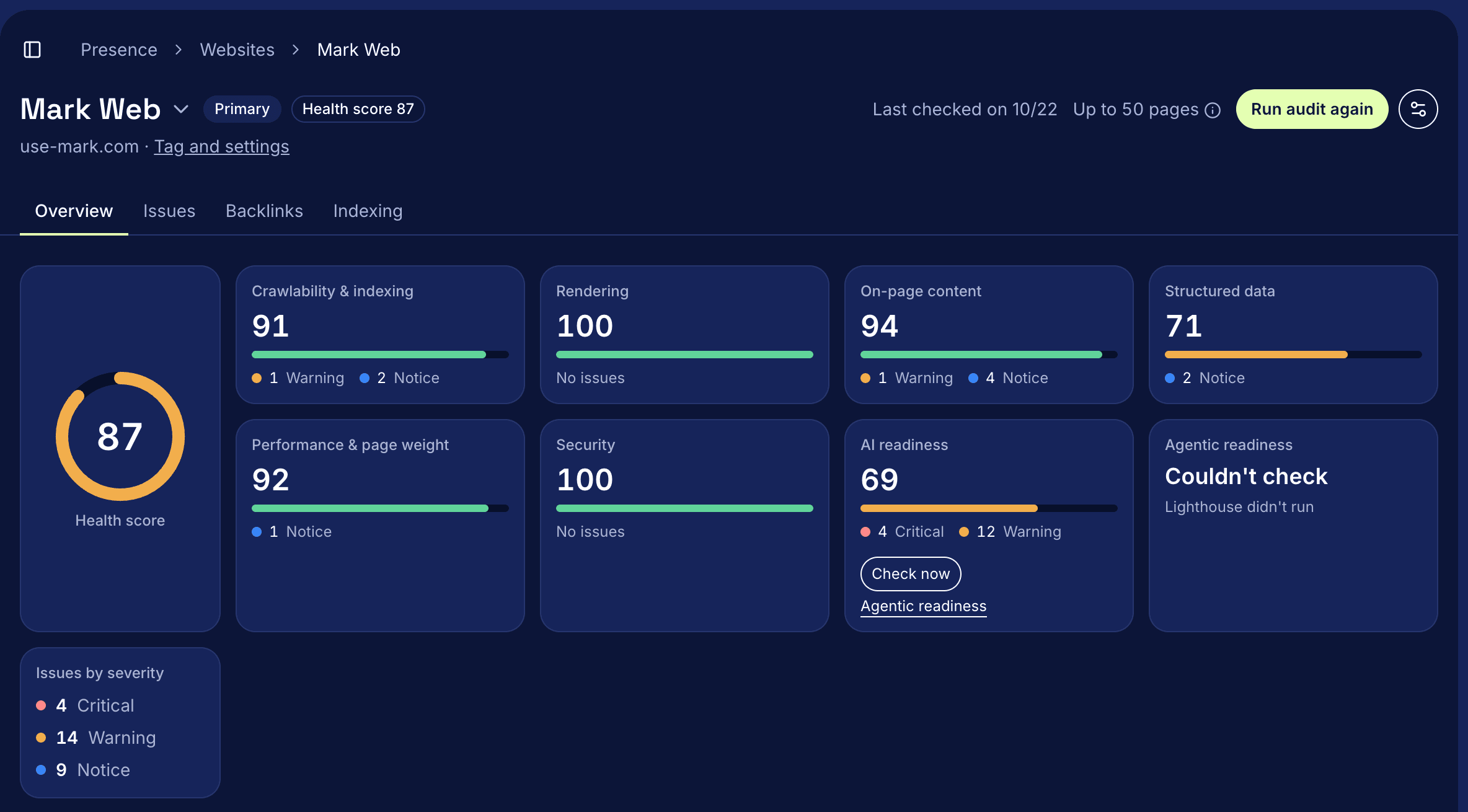
Mark's SEO site audit crawls up to 50 pages of your website with JavaScript turned on, the way a browser sees them, and gives the site a health score from 0 to 100. Each issue is marked Critical, Warning or Notice and comes with a sentence on how to fix it. An action plan, written by AI from the audit's findings, sorts the fixes into this week, next and later. Check the plan before you act on it.
How it works
- Open Presence > Websites and select Run audit. One run covers up to 50 pages, and a progress bar shows how many are done.
- To audit once a week, open Audit settings, choose Weekly and select Save schedule.
- Read the health score and its seven category tiles: crawlability and indexing, rendering, on-page content, structured data, performance and page weight, security, and AI readiness. Select a tile to see only its issues.
- Read Action plan. Each fix names the issues it solves and how many pages they affect.
- On the Issues tab, work By issue or By page. Each issue says what the audit found, how to fix it, and up to 10 of the affected pages.
- Run the audit again after you fix things. Overview shows how many issues are new and how many are fixed since the audit before.
Questions
Does the audit change anything on my site?
No. Mark only recommends. You make the fixes, add the links and set up redirects on your own site or website platform.
What if my site needs JavaScript to show its content?
If search engines that don't run JavaScript see a blank page, a red alert sits at the top of Overview with the fix: serve each page's HTML through prerendering or server rendering. The audit also labels each page, for example Needs JavaScript or Server HTML, under How AI crawlers read your pages.
Does it check whether AI crawlers can read my site?
Yes. Each audit reads your robots.txt and shows, for each AI crawler such as OAI-SearchBot or PerplexityBot, whether it's allowed or blocked and the rule that applies.
What happens if an audit doesn't finish?
The report says The audit didn't finish and shows why, for example when robots.txt blocks the crawler or the site can't be reached. Fix the cause and select Try again. Your last finished audit stays on Overview in the meantime.
Read the docs
The site audit guide lists every check, how the score is weighted and what each section shows.